

Harakabet Login & Registration in Kenya
Creating a Harakabet account requires a mobile number, a secure password, and confirmation of the number through a one-time SMS code. Returning players can then sign in using their registered credentials.
This guide explains registration and login step by step, including account requirements, password recovery, common access problems, and the identity checks that may be requested later.
How to Register a New Harakabet Account
Registration is designed for mobile use and normally begins with a short form. The exact fields and verification steps may vary, so players should follow the current instructions shown on the official registration screen.
| Requirement | Details |
|---|---|
| Minimum Age | 18 years or the higher legal age applicable to the player |
| Phone Number | A valid mobile number that the account holder controls |
| Password | Must satisfy the rules displayed on the registration form |
| Confirmation | An OTP may be sent by SMS to verify the number |
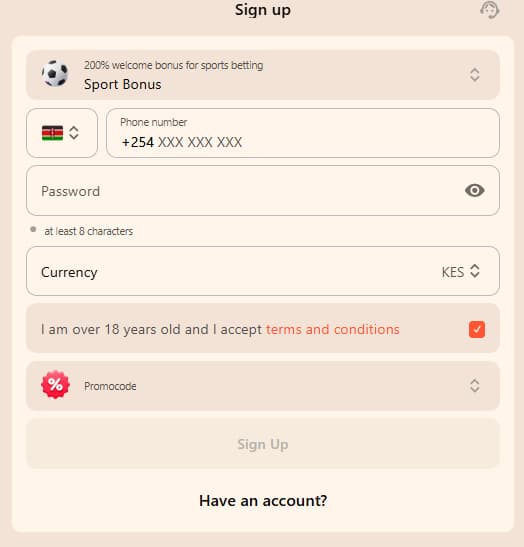
Step-by-Step Mobile Sign-Up Guide
- Open the official Harakabet website or app and select Register.
- Enter the requested mobile number and check it carefully.
- Create a unique password that meets the displayed security requirements.
- Provide any additional personal details requested by the registration form.
- Confirm that you meet the age requirement and review the Terms & Conditions.
- Enter the one-time code sent by SMS if phone verification is required.
- After registration is confirmed, sign in and review the account details before depositing.
Account Creation Requirements & Terms
Players are expected to meet the applicable age requirement, provide accurate information, and comply with the account rules displayed during registration. Duplicate accounts or false details may result in restrictions while the account is reviewed.
- Use only one personal account unless the current terms clearly state otherwise
- Enter a legal name, correct date of birth, and active phone number
- Read and accept the platform’s Terms & Conditions before registering
- Confirm that account access is permitted in your location
- Be prepared to verify account information when requested
How to Log In to Harakabet Kenya
Returning players can sign in through the login form on the website or app. A standard login normally requires the registered phone number or account identifier and the correct password. Additional confirmation may be requested after unusual activity, a new device, or a security check.
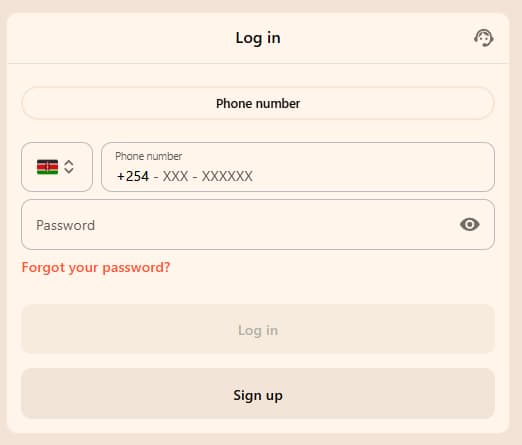
Harakabet Account Sign-In Process
- Open the official Harakabet sports betting website or app.
- Select Login or Sign In.
- Enter the phone number or account identifier used during registration.
- Enter the account password and check for typing errors.
- Select Sign In and complete any additional security prompt.
Password Recovery & Login Troubleshooting
If the password has been forgotten, use the official recovery option rather than repeatedly guessing. The platform may send a reset code to the registered phone number.
- Select Forgot Password on the login screen.
- Enter the phone number or identifier connected to the account.
- Enter the reset code received through the official recovery channel.
- Create a new, unique password and confirm the change.
- Return to the login screen and sign in with the new password.
SMS code not received
Check the number, mobile signal, message filtering, and whether the resend timer has finished.
Password rejected
Check capitalization and spacing, or use the official password-reset process.
Page not loading
Try a stable connection, update the browser, or reopen the official app.
Account temporarily locked
Stop repeated attempts and follow the displayed recovery or support instructions.
Clearing browser data or reinstalling an app should not be the first step because it can remove useful session information. First confirm the credentials, connection, official website address, and any on-screen error message.
Account Verification & Safety Standards
Account checks may combine phone confirmation, identity verification, and ongoing security monitoring. The timing and documents required can depend on the player’s activity, withdrawal request, account status, and current platform procedures.
| Verification Stage | What May Be Checked | Typical Timing |
|---|---|---|
| Phone Verification | Confirmation of the registered mobile number | During registration or a security check |
| Identity Verification | Accepted ID document and matching personal details | Before certain withdrawals or when requested |
| Account Security | Password, device, session, and login activity | Ongoing |
Verification requirements and review times can vary. Follow the instructions inside the secure account area and avoid sending identity documents through unofficial contacts.
Use a password that is not shared with email, banking, or social-media accounts. Never disclose your password, OTP, M-Pesa PIN, or recovery code to anyone claiming to provide support.
FAQ
Do I need an email address to register on Harakabet?
No, registration only requires a valid Kenyan phone number and a password. An email address may be optional for additional account notifications.
What should I do if I forgot my Harakabet password?
Tap “Forgot Password” on the login screen, enter your registered phone number, and follow the SMS reset code to set a new password. This resolves most login issues in under a minute.
Can I have more than one Harakabet account?
No, Harakabet allows only one account per person, verified against identity documents. Multiple accounts risk suspension and forfeiture of funds.
Why hasn’t my OTP code arrived during registration?
This usually means a typo in the phone number field or a delay from your mobile network. Double-check the number entered and request a new code if needed.
How long does identity verification take on Harakabet?
Verification typically completes within a few hours of submitting a clear photo of your national ID or passport. Delays usually happen when the document is blurry or the name doesn’t match your registered details.


